All about product
Description
Specification
Reviews
1
Questions0
Installing the module
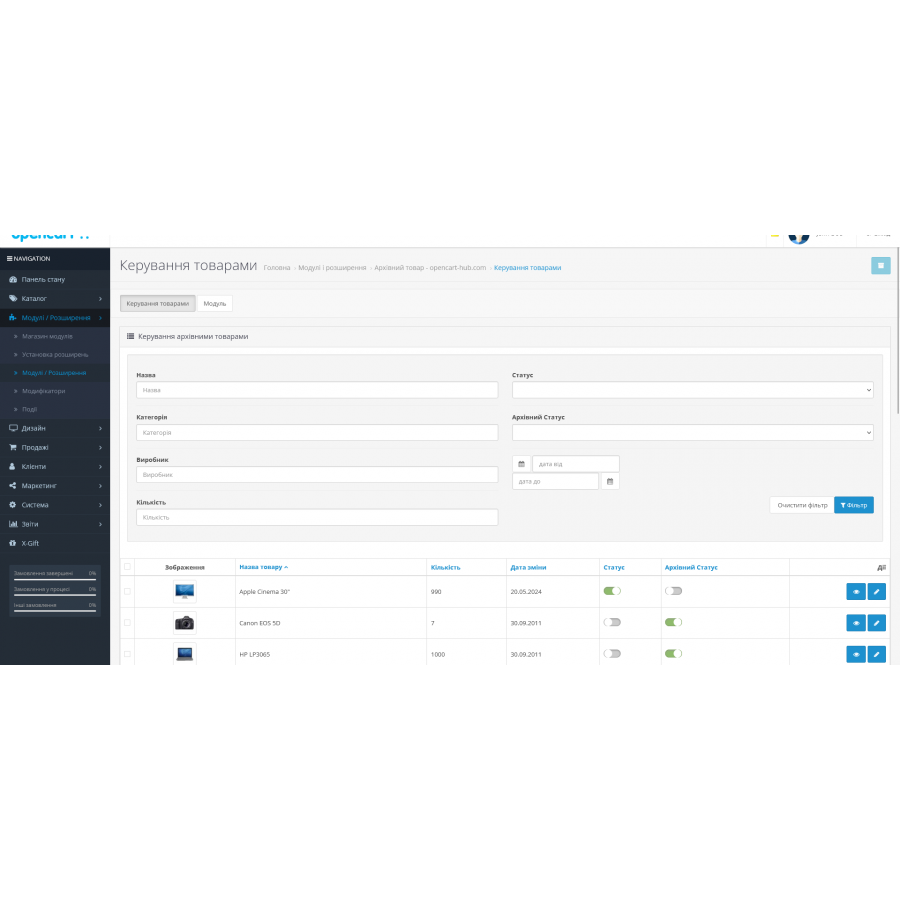

Archive product module for Opencart
Product Code: 326
Version: 1.0
In Stock
450 грн
Main specifications
PHP:
7.2-7.4
Compatibility:
2.3.0.0, 2.3.0.1, 2.3.0.2, 3.0.0.0, 3.0.1.1, 3.0.1.2, 3.0.2.0, 3.0.3.0, 3.0.3.1, 3.0.3.2, 3.0.3.3, 3.0.3.5, 3.0. 3.6, 3.0.3.7, 3.0.3.8
Localization:
Russian, Ukrainian, English
Ocmod:
No
Adaptation to your store:
Paid
All specifications
Description
There are many products in the store and some of them have lost their relevance (for example, discontinued - end of life). I don't want to delete (hide) them, because it is possible that search "additional traffic" goes to it. In addition, there are characteristics and specifications specific to the product. I would like the archival products to be available via a direct link, but they did not participate anywhere in the lists, including they did not get into the site map. This is implemented in many manufacturers and large trading platforms. The module has its own interface for status management.
- removes the product from the site card
So
- removes a product from the general list of products in a category.
So
Does the product url change?
No
Does the product that we transfer to Archive status with the module remain enabled or disabled?
Disabled
What is the status of the archive product?
archive = Status: disabled + archive status: enabled (visually in the module - gray + green)
- removes the product from the site card
So
- removes a product from the general list of products in a category.
So
Does the product url change?
No
Does the product that we transfer to Archive status with the module remain enabled or disabled?
Disabled
What is the status of the archive product?
archive = Status: disabled + archive status: enabled (visually in the module - gray + green)
Specifications
Characteristics
PHP
7.2-7.4
Compatibility
2.3.0.0, 2.3.0.1, 2.3.0.2, 3.0.0.0, 3.0.1.1, 3.0.1.2, 3.0.2.0, 3.0.3.0, 3.0.3.1, 3.0.3.2, 3.0.3.3, 3.0.3.5, 3.0. 3.6, 3.0.3.7, 3.0.3.8
Localization
Russian, Ukrainian, English
Ocmod
No
Adaptation to your store
Paid
Працює гарно, давно не вистачало такої функції в магазині
Is this review helpful?
0
No questions about this product, be the first and ask your question.
Installing the module
Module installation instructions:
- Before performing any actions related to installing an add-on in Opencart, we recommend creating a backup copy of all site files and the store database ;
- Install the localcopy fix (if you don't have it installed yet)
- Download the module file for the desired Opencart version from our website ( Follow the installation instructions if there are any in the module archive );
- Then go to the "Installing add-ons/extensions" section and click on the " Download " button;
- Select the downloaded file and wait for the module to be fully installed and for the text "Application installed successfully" to appear;
- After that, go to " Application Manager " and update the modifiers by clicking the " Update " button;
- After these actions, you need to add the rights to view and manage the module in the " User Groups " section for the administrator or other users you select by clicking " Select All ".