All about product
Description
Specification
Reviews
1
Questions0
Installing the module


Gallery RB - gallery with description and video output for OpenCart
Product Code: 191
Version: 3
In Stock
450 грн
Main specifications
PHP:
7.2-7.4
Compatibility:
OpenCart 3, ocStore 3
Localization:
English, Ukrainian, Russian
Ocmod:
Yes
Adaptation to your store:
Paid
All specifications
Description
Gallery for OpenCart with description output. With the help of this module, you will be able to make a nice portfolio or gallery of works for your website.
Conclusion using a shortcode in the description of the product, category, article, news of the Unishop template ( only in these types of pages ).
Advantages:
- the ability to insert a gallery into the description of a product, category or article using a shortcode (by analogy with WordPress)
- option to put a gallery in the blog article for the UniShop template
- responsive design (bootstrap grid, and the popup image adapts to the screen size)
- 3 display options: Tile, Carousel, Masonry
- setting the number of image columns (1, 2, 3, 4, 6 and 12 columns)
- adaptation for mobile devices (for 4 screen resolutions, you can choose the required number of speakers)
- 5 options for hover animation
- output of the gallery as a separate page and in any other part of the site in the form of a module
- the module combines a gallery and banners that can lead to any page of the site
- support for youtube and vimeo videos in popup window
- the ability to add a "Show more" button so as not to overload the gallery page
- the possibility of mass uploading of photos
- sort images by dragging
- image description with visual editor and html support
- each image can have a unique description design.
- the module uses a script that is already in openmap, thus not overloading the site's code
- several image appearance animations
- three options for placing the text: under the photo, on the photo when hovering the mouse and always on the photo
- the ability to add a frame to photos
- the ability to display the title of each gallery
- the ability to add title and alt attributes to each image
Installing the module
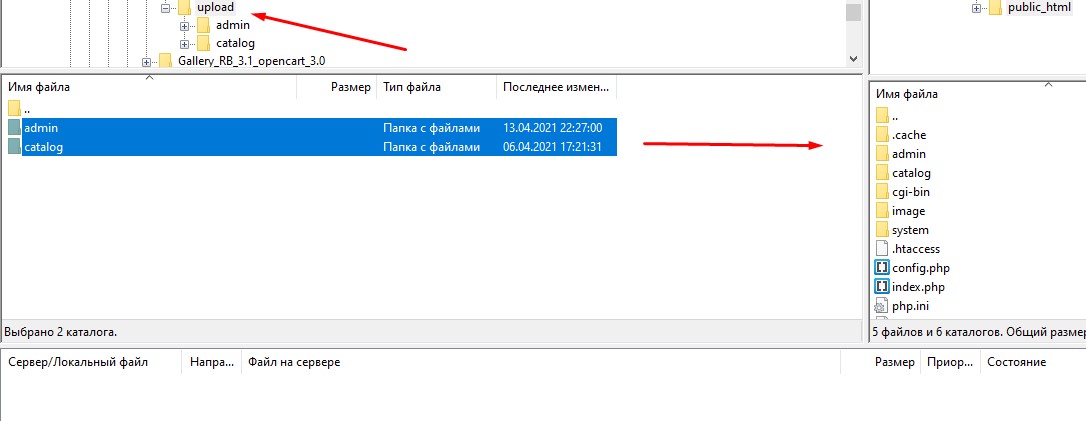
- Copy the contents of the upload folder to your site folder. When asked about overwriting files, select "Skip" for all files. The module contains ckeditor, magnific popup and jquery ui files for those versions of openmap that do not have them.
- In the admin panel of the site, in the Add-ons / Modules section, opposite the Gallery RB that appeared, click the "Install" button.
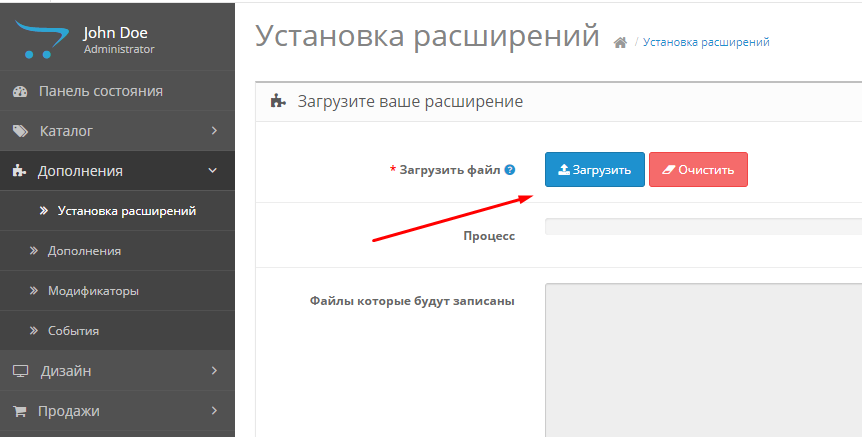
- Under Modules (Extensions) / Extension Settings, download the file gallery_rb.ocmod.xml (for opencart 2.x) or gallery_rb.ocmod.zip (for opencart 3.x) from the module folder. For Opencart versions 2.1 and 2.3, the FTP accesses should be specified in the System/Settings section of the FTP tab. This extension requires the output of the module using a shortcode in the description of products, categories or articles.
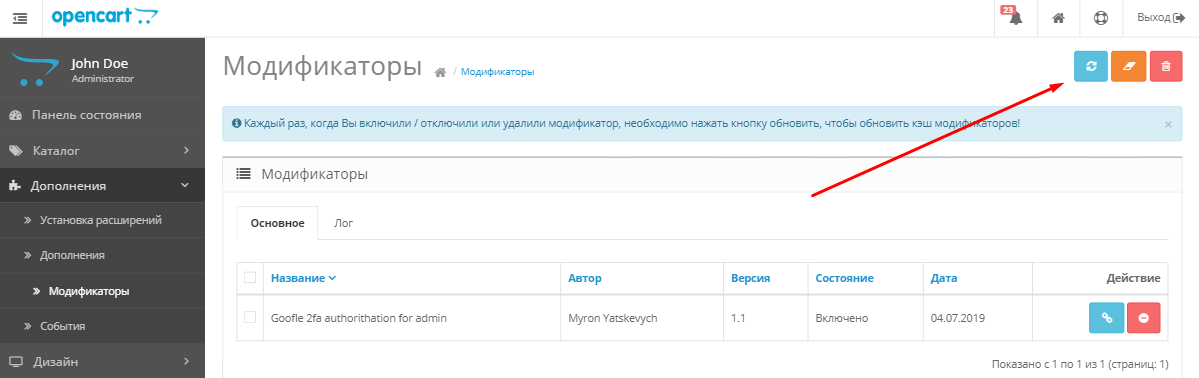
- In the Modules / Modifiers section, refresh the modifier cache.
- The module is installed.
Gallery settings
- In modules, click the edit gallery icon opposite Gallery RB. The module settings page will open.
- Specify the size of the previous image. In any case, the module will stretch or visually compress the picture to the width of the column. The width of your preview should be approximately equal to the width of the gallery column. This option does not allow you to adjust the margins between images.
- For text on images, you can set the background and transparency of this background.
- At the very bottom of the page, you can add images for your gallery, add a description to them (using a visual editor)
- The gallery can work as a photo album, when you click on the thumbnails, large photos will open. But if you specify a link to another page of the site or another site in general in the gallery settings, then when you click on the site, you will be redirected to this page. Thus, the gallery can work as banners. You can add links to youtube, vimeo to images. The video will play in a pop-up window. Video links should look like this: https://www.youtube.com/watch?v=1i3QLck0UD0
https://vimeo.com/421877934
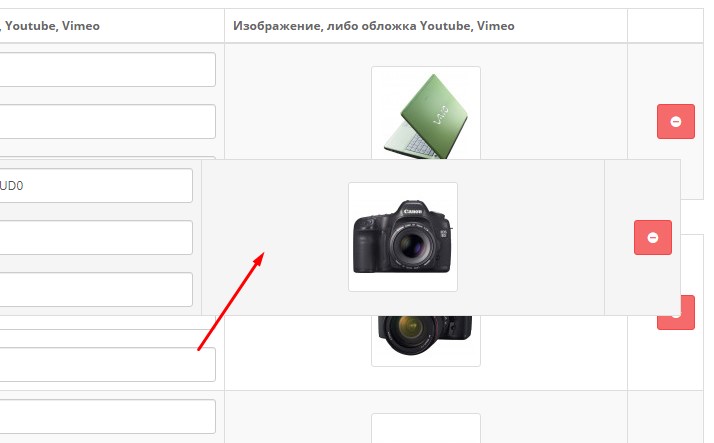
- The sort order for images can be set by dragging blocks from the photo.
- Change the status to "Enabled" and save the gallery.
- The gallery has been successfully created. Now you can place it anywhere on your site in the Design / Schemes (Layouts) section, just like any other standard Opencart module.
Or added to the description of the product, category or article using a shortcode (only in the specified places on the site) .
1. Gallery as a module (for example, categories)
- You can place the gallery anywhere on your site in the Design / Schemes (Layouts) section, just like any other standard Opencart module.
2. Gallery as a separate page
- Go to the Design / Scheme (Layouts) section and click on the "+" on the top right to create a new Scheme (Layout)
- Give your scheme (layout) a name, for example "Gallery"
- Next, select the location of the module, for example, Bottom of the page
- Go to Catalog / Articles and add an article. Customize your page title and add a description if needed
- On the Design tab, select the layout you created earlier
- Thus, you can create many galleries with different designs.
2. Adding a gallery using a shortcode
- The gallery can be added directly to the description of the following pages: product, category, article.
- After you've created a gallery, save it.
- In the Shortcode field, a code to be inserted into the page description will appear.
- Copy this code and paste it into the page description.
Visual editor
You can customize the display of attention-grabbing titles and taglines on your images. For advanced users, you can add arbitrary html code and style the text to your liking.
Specifications
Characteristics
PHP
7.2-7.4
Compatibility
OpenCart 3, ocStore 3
Localization
English, Ukrainian, Russian
Ocmod
Yes
Adaptation to your store
Paid
Простий у використанні, швидко налаштовується., ідеально підходить для портфоліо
Is this review helpful?
0
No questions about this product, be the first and ask your question.
Installing the module
Module installation instructions:
- Before performing any actions related to installing an add-on in Opencart, we recommend creating a backup copy of all site files and the store database ;
- Install the localcopy fix (if you don't have it installed yet)
- Download the module file for the desired Opencart version from our website ( Follow the installation instructions if there are any in the module archive );
- Then go to the "Installing add-ons/extensions" section and click on the " Download " button;
- Select the downloaded file and wait for the module to be fully installed and for the text "Application installed successfully" to appear;
- After that, go to " Application Manager " and update the modifiers by clicking the " Update " button;
- After these actions, you need to add the rights to view and manage the module in the " User Groups " section for the administrator or other users you select by clicking " Select All ".