All about product
Description
Specification
Reviews
0
Questions0
Installing the module


"Home Widgets" (MultiWidget) module for Opencart Control Panel
Product Code: 402
Version: 1.0
In Stock
450 грн
Main specifications
PHP:
7.2-7.4
Compatibility:
3.0.0.0, 3.0.1.1, 3.0.1.2, 3.0.2.0, 3.0.3.0, 3.0.3.1, 3.0.3.2, 3.0.3.3, 3.0.3.5, 3.0.3.6, 3.0.3.7, 3.0.3.8
Localization:
English, Ukrainian, Russian
Ocmod:
Yes
Adaptation to your store:
Paid
All specifications
Description
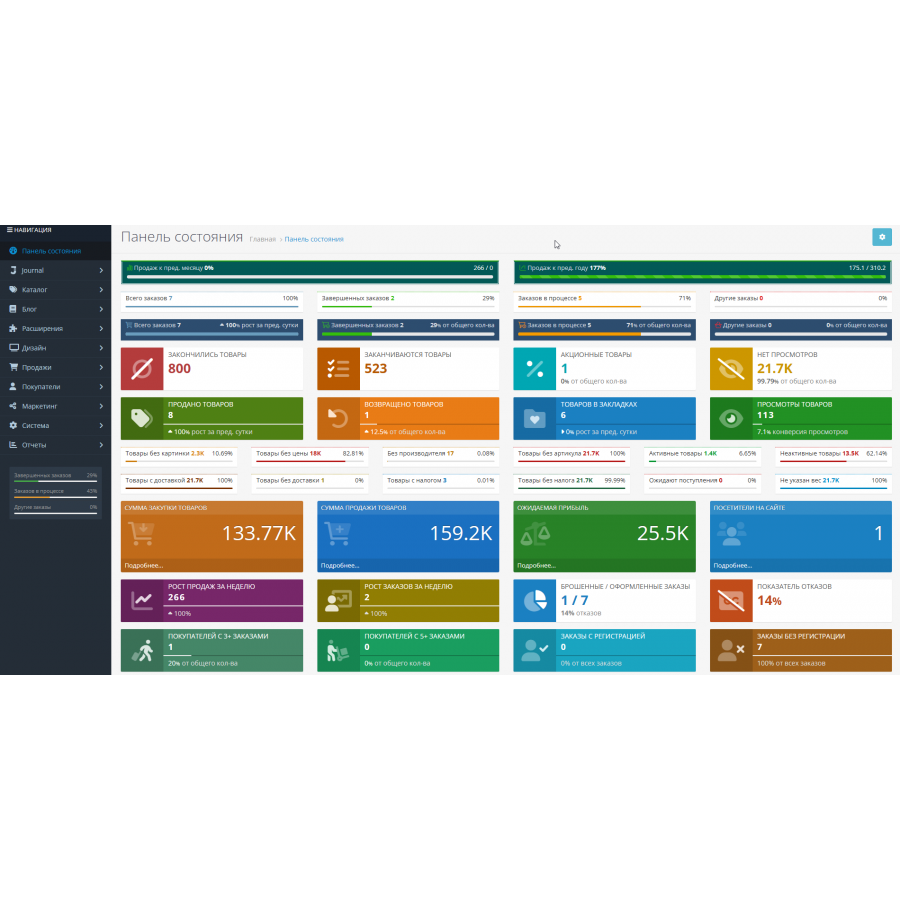
The "Home Widgets" (MultiWidget) module for the Opencart control panel.
Displays in the admin on the main page (Control Panel) a lot of useful summary and statistical information in a compact or expanded form with color, text and many other settings. etc. without fixing the files.
In the module 2 types of widgets:
* Display of widgets is configured for each group of users separately. Viewing and editing rights for the module are automatically granted to the group of the user who installed the module (usually this is the Administrators group). When configuring the module for other user groups, you need to add view and edit rights to extension/dashboard/multiwidget .
* Ability to save and restore settings from a file, load default settings. Standard widget parameters: Width, Status, Sort order.
Additional options for simple widgets:
Displays in the admin on the main page (Control Panel) a lot of useful summary and statistical information in a compact or expanded form with color, text and many other settings. etc. without fixing the files.
In the module 2 types of widgets:
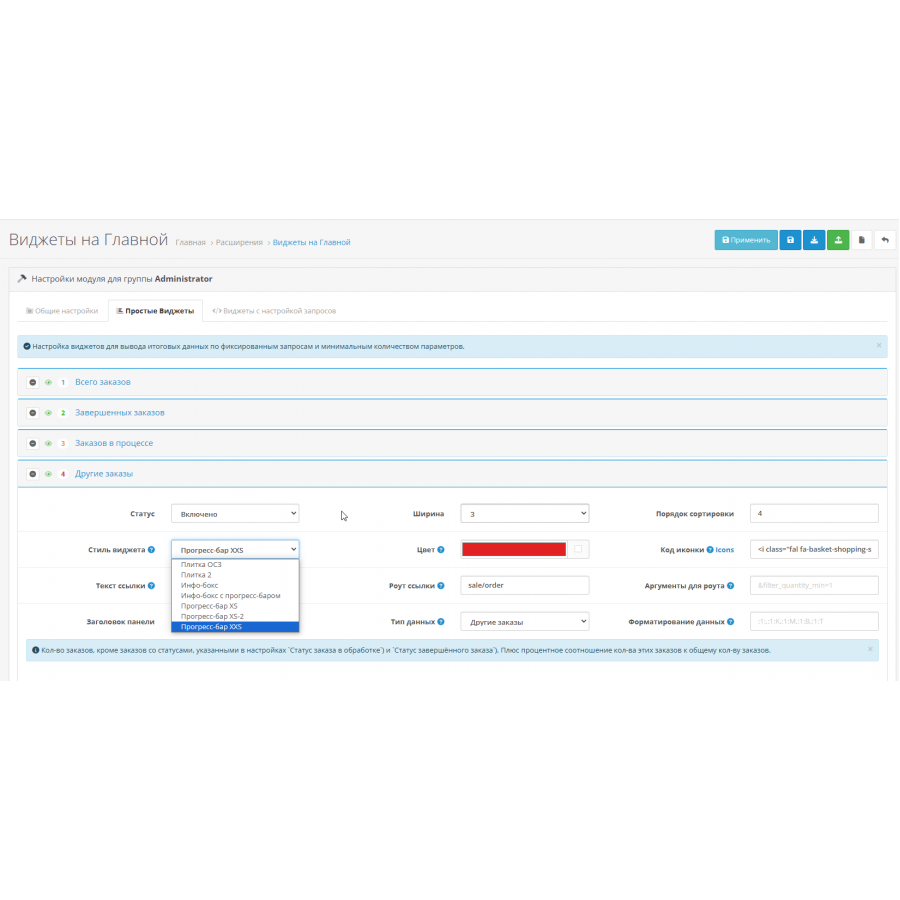
- Simple, with fixed ( 28+ ) requests (can be set up quickly and easily).
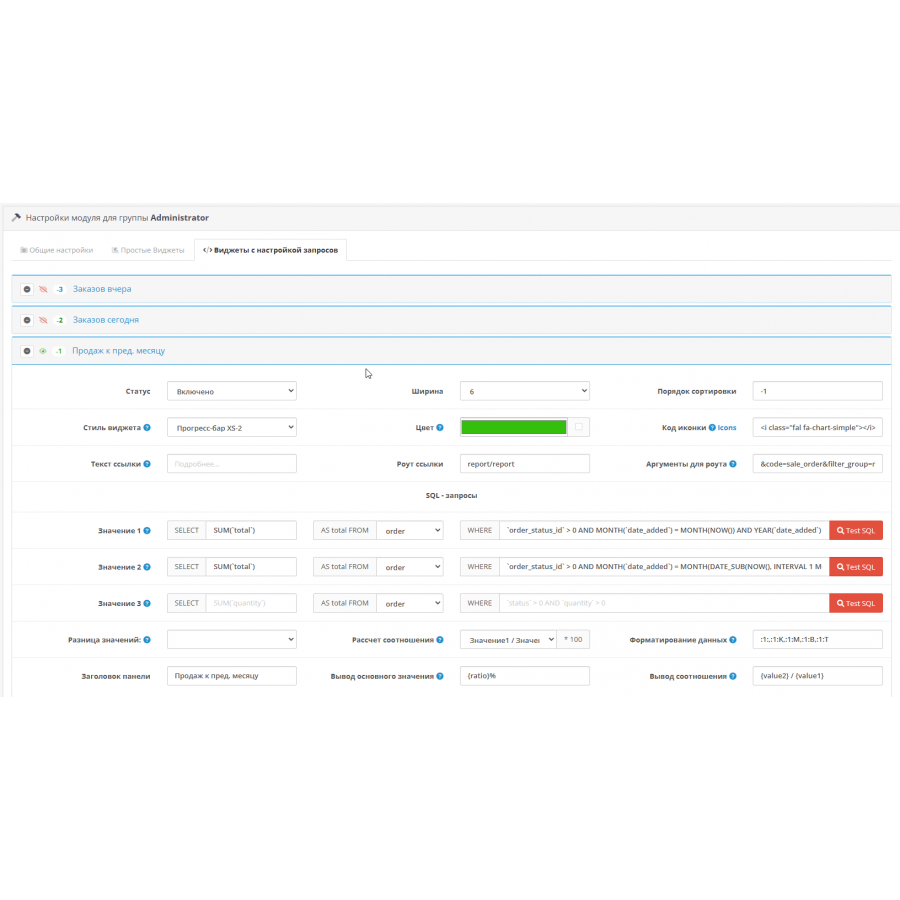
- Widgets for configuring SQL queries. It is more complicated here, but it is possible to configure the output of very different useful information (which is often not enough in standard openmap modules) without editing files.
* Display of widgets is configured for each group of users separately. Viewing and editing rights for the module are automatically granted to the group of the user who installed the module (usually this is the Administrators group). When configuring the module for other user groups, you need to add view and edit rights to extension/dashboard/multiwidget .
* Ability to save and restore settings from a file, load default settings. Standard widget parameters: Width, Status, Sort order.
Additional options for simple widgets:
- Widget style (at the moment there are 6 ready-made styles, including Opencart style)
- Color (setting the background and/or text color depends on the widget style)
- Icon code (any available in fontawesome library v.6.1.0)
- Link for More details (text, root, arguments (that is, we go where we need to and we can immediately filter the data))
- Panel title
- Data type (currently 28 (or 30 if using purchase price) fixed queries available)
- Data formatting (left/right text, rounding rules).
- Standard: 'Total orders', 'Total sales', 'Total buyers', 'Online visitors'
- Additional by fixed queries: 'Orders in progress', 'Complete orders', 'Other orders', 'Total sales', 'Total buyers', 'Buyers with 1+(3+,5+) orders (+ percentage of total circles) -va, i.e. the indicator by which we see how many customers return (make repeat orders))', 'Number of product items', 'Number of product units', 'Number of product units', 'Amount of sales of goods', 'Amount of sales of goods', ' Products sold', 'Products returned', 'Bookmarked products', 'Product views (view conversion)', 'Products returned', 'Orders yesterday', 'Orders today'. If the system uses the purchase price (`cost' field in the goods table), you can additionally display: 'Amount of goods purchase', 'Expected profit'.
- three sql-queries, for each available data selection from 5 tables (order, product, order_product, customer_online, customer_wishlist)
- settings for obtaining the difference of values (for further calculations and/or displaying data in the widget)
- settings for the calculation of the percentage ratio of the received data
- key value output pattern
- ratio output pattern.
- Sold (for the amount) to the level of the last month (we see the dynamics of achieving the indicators of a certain period, the periods are easy to change (applies to all similar widgets))
- Sold to last year's level
- Sales growth for the week
- Increase in the number of orders per week
- Abandoned / Completed orders (+ percentage of refusals)
- Failure rate (%)
- Orders with registration (+ percentage of the total, i.e. what percentage of orders are made by registered users)
- Order without registration (similar to the previous item)
- Out of stock (number of product items)
- Out of stock (number of product items)
- Yesterday's orders (off by default)
- Orders Today (off by default)
Specifications
Characteristics
PHP
7.2-7.4
Compatibility
3.0.0.0, 3.0.1.1, 3.0.1.2, 3.0.2.0, 3.0.3.0, 3.0.3.1, 3.0.3.2, 3.0.3.3, 3.0.3.5, 3.0.3.6, 3.0.3.7, 3.0.3.8
Localization
English, Ukrainian, Russian
Ocmod
Yes
Adaptation to your store
Paid
There are no reviews for this product, be the first to leave your review.
No questions about this product, be the first and ask your question.
Installing the module
Module installation instructions:
- Before performing any actions related to installing an add-on in Opencart, we recommend creating a backup copy of all site files and the store database ;
- Install the localcopy fix (if you don't have it installed yet)
- Download the module file for the desired Opencart version from our website ( Follow the installation instructions if there are any in the module archive );
- Then go to the "Installing add-ons/extensions" section and click on the " Download " button;
- Select the downloaded file and wait for the module to be fully installed and for the text "Application installed successfully" to appear;
- After that, go to " Application Manager " and update the modifiers by clicking the " Update " button;
- After these actions, you need to add the rights to view and manage the module in the " User Groups " section for the administrator or other users you select by clicking " Select All ".