



OpenCart Bulk Price Management Module
Bulk price management module for OpenCart
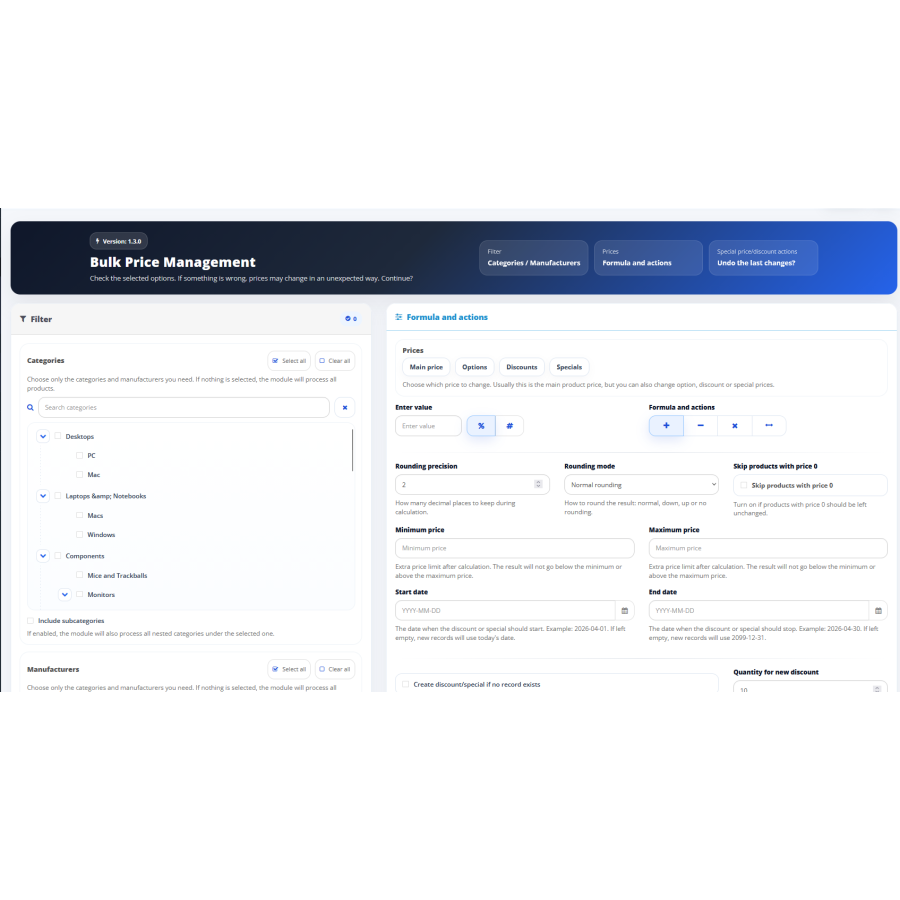
The Bulk Price Management module for OpenCart allows you to quickly change the cost of products in the catalog without having to manually edit each item individually. The extension is designed to automate the work of the store administrator and significantly reduce the time spent updating price lists. If your catalog contains hundreds or thousands of products, manual bulk price adjustments can be time-consuming and error-prone. With this module, changes are made automatically and applied to all products according to the specified parameters.
The main purpose of the module is to mass change the prices of goods in a few clicks. The user selects the type of mathematical operation and specifies the value, after which the system automatically performs the recalculation. The operations of addition, subtraction, multiplication and division are supported. This allows you to use the module to increase prices, create promotional offers, apply discounts, compensate for currency exchange rate changes or update the cost of goods after changing purchase prices.
The extension works directly through the OpenCart administrative panel and does not require complex configuration. After installation, the module is ready for use and integrates into the standard functionality of the system. All actions are performed through a simple interface that contains only the necessary parameters for work. Thanks to this, the administrator can quickly perform the desired operation even without special technical knowledge.
The module is especially useful for stores that regularly update price lists. For example, if a supplier has increased purchase prices or the exchange rate has changed, there is no need to manually edit each product. It is enough to set the required coefficient or adjustment value, after which the system will automatically recalculate all prices in the catalog. This allows you to significantly speed up work and reduce the risk of human errors.
One of the advantages of the solution is the predictability of the result. All products are processed according to the same rules, which eliminates the appearance of random deviations in prices. After the operation is completed, the new values are automatically saved in the database and immediately displayed on the store window. The administrator gets full control over the price change process and can quickly respond to any changes in the market situation.
The module is suitable for online stores of any scale. It works equally effectively with both small catalogs and large stores containing thousands of product lines. Automation of mass price updates saves time, simplifies store administration, and helps maintain the relevance of the price list.
Main features
- Mass change in prices of all products in the catalog.
- Addition, subtraction, multiplication, and division operations.
- Fast update of a large number of products.
- Automatic price recalculation without manual editing.
- Apply changes to the entire catalog at once.
- Simple and clear interface.
- Minimum number of settings.
- Support for regular price list updates.
- The expected result of performing operations.
- Ability to restore previous values.
- Integration with the standard OpenCart interface.
- Reducing the number of routine administrator operations.
Benefits for business
Using the mass price management module allows you to optimize the process of administering an online store, quickly respond to market changes, and maintain price updates without significant time costs. Automatic price list updates help avoid errors, ensure a uniform pricing policy, and increase efficiency when working with a large range of products.
Attention! Before performing a mass price update, it is recommended to create a backup copy of the store database to enable quick recovery of information in case of an error or incorrect parameter settings.
No questions about this product, be the first and ask your question.
Module installation instructions:
- Before performing any actions related to installing an add-on in Opencart, we recommend creating a backup copy of all site files and the store database ;
- Install the localcopy fix (if you don't have it installed yet)
- Download the module file for the desired Opencart version from our website ( Follow the installation instructions if there are any in the module archive );
- Then go to the "Installing add-ons/extensions" section and click on the " Download " button;
- Select the downloaded file and wait for the module to be fully installed and for the text "Application installed successfully" to appear;
- After that, go to " Application Manager " and update the modifiers by clicking the " Update " button;
- After these actions, you need to add the rights to view and manage the module in the " User Groups " section for the administrator or other users you select by clicking " Select All ".