All about product
Description
Specification
Download
Reviews
0
Questions0
Installing the module

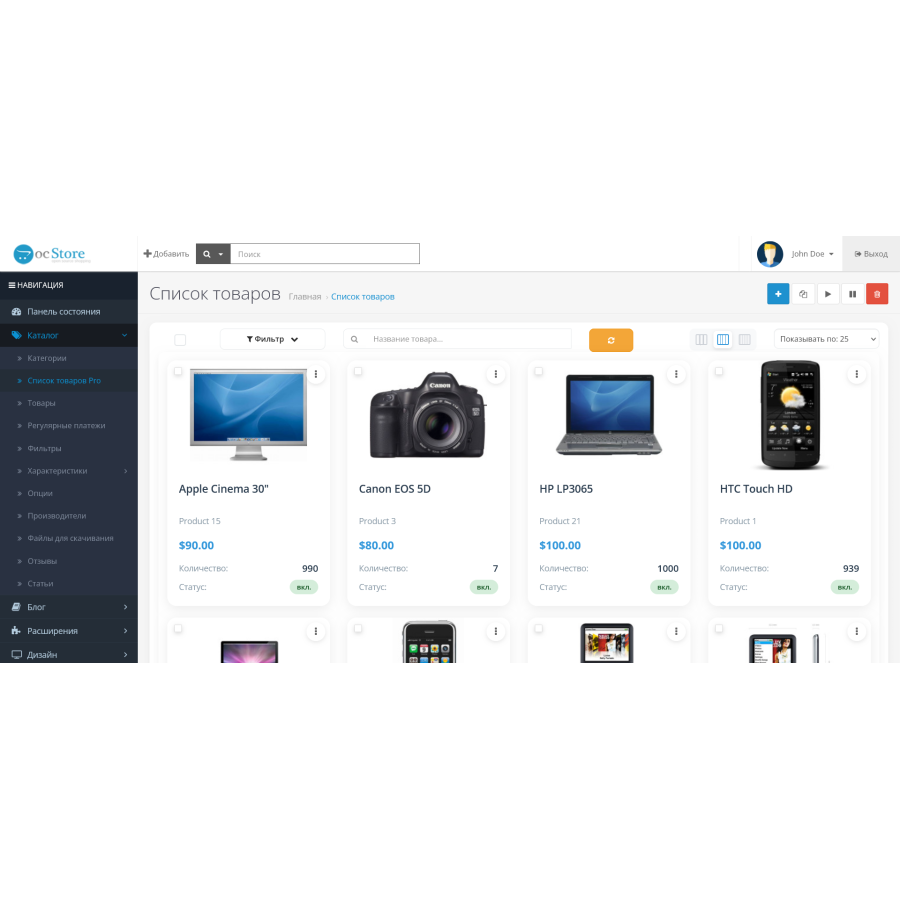


Product List Pro — card catalog in the OpenCart admin
Product Code: 568
Version: 3.0
In Stock
FREE
Main specifications
PHP:
7.2-7.4
Compatibility:
ocStore 3.x
Localization:
Ukrainian, Russian, English
Ocmod:
Yes
Adaptation to your store:
Paid
All specifications
Description
Product List Pro - card catalog in the OpenCart 3 admin
Product List Pro is a modern extension for convenient product management in the admin panel. Instead of the usual table, you get a card grid , which speeds up work and makes the product list more visual.
Opportunities
- Card interface - choose to display in a 3/4/6 column grid.
- AJAX filters — quick search without reloading the page by: name, model, price, categories, and manufacturers.
- One-click status - turn on/off the product by clicking on the badge.
- Mass actions - copy, delete and change status for selected products.
- Adaptive design - correct work on different screen resolutions.
- Full localization - support for UA, RU and EN .
Installation
- Download the archive using the Extension Installer .
- Go to Modifications and click Update .
- Important: open System → Users → User Groups and grant access/modify rights to
catalog/product_extra. - After installation, the module will appear in the menu: Catalog → Extra Product List .
Features
- The module does not replace system files - the probability of conflicts with other extensions is minimal.
- Distributed free of charge and provided "as is" .
- Support and individual modifications are not provided.
- The author is open to constructive ideas and may consider suggestions in future versions.
Specifications
Characteristics
PHP
7.2-7.4
Compatibility
ocStore 3.x
Localization
Ukrainian, Russian, English
Ocmod
Yes
Adaptation to your store
Paid
 ProductListPro.ocmod.zip
There are no reviews for this product, be the first to leave your review.
No questions about this product, be the first and ask your question.
Installing the module
Module installation instructions:
- Before performing any actions related to installing an add-on in Opencart, we recommend creating a backup copy of all site files and the store database ;
- Install the localcopy fix (if you don't have it installed yet)
- Download the module file for the desired Opencart version from our website ( Follow the installation instructions if there are any in the module archive );
- Then go to the "Installing add-ons/extensions" section and click on the " Download " button;
- Select the downloaded file and wait for the module to be fully installed and for the text "Application installed successfully" to appear;
- After that, go to " Application Manager " and update the modifiers by clicking the " Update " button;
- After these actions, you need to add the rights to view and manage the module in the " User Groups " section for the administrator or other users you select by clicking " Select All ".