
Opencart site multilingual setting service
We offer multilingual setup services for your online store on the OpenCart platform, expanding its accessibility and convenience for different audiences. Our comprehensive approach includes adding new languages, optimizing URLs, creating multilingual sitemaps, customizing meta tags for different language versions, integrating language prefixes into URLs, and even the ability to use different logos for each language.
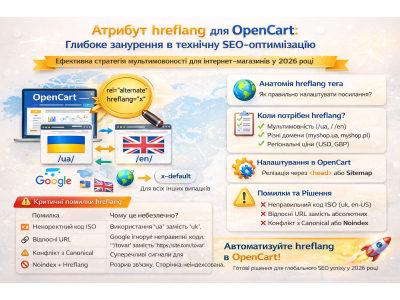
We install language packs for OpenCart, apply SEO optimization to solve CNC problems and avoid duplicates, ensure correct page indexing with rel="alternate" hreflang. We also configure multilingual meta-tags for the main page and optimize the multilingual sitemap.xml according to the requirements of search engines.
Our team works with various date and time formats, can perform mass translation of content using the Google Translate API, and provides additional services upon agreement.
After setting up multilingualism, your users will be able to easily switch the language of the content, and search engines will effectively index the multilingual pages of your online store.
No questions about this product, be the first and ask your question.
Module installation instructions:
- Before performing any actions related to installing an add-on in Opencart, we recommend creating a backup copy of all site files and the store database ;
- Install the localcopy fix (if you don't have it installed yet)
- Download the module file for the desired Opencart version from our website ( Follow the installation instructions if there are any in the module archive );
- Then go to the "Installing add-ons/extensions" section and click on the " Download " button;
- Select the downloaded file and wait for the module to be fully installed and for the text "Application installed successfully" to appear;
- After that, go to " Application Manager " and update the modifiers by clicking the " Update " button;
- After these actions, you need to add the rights to view and manage the module in the " User Groups " section for the administrator or other users you select by clicking " Select All ".