
CSV ( Comma-Separated Values ) is a text format designed to represent tabular data. A table row corresponds to a line of text containing one or more fields separated by commas (wikipedia.org).
The CSV format is not fully standardized. The name of the format - CSV (comma-separated values) - indicates that a comma is used to separate the fields. However, the term CSV can be used to refer to similar formats. Many programs understand CSV to be the more general DSV ( delimiter-separated values ) format, which allows the use of other characters as separators.
In other words, it is a text file that contains information in the form of separate lines, where each line is a separate record (for example, about one product). The delimiter ( delimiter ) of column values ( CSV field separator ) is a comma (,) or semicolon (;).
Text separator – values containing reserved characters (double quote, comma, semicolon, newline) are enclosed in double quotes (“). If quotes are found in the value, they are presented in the file as two consecutive quotes.
CSV field names – the first line of the file usually follows the CSV field (column) names to identify those fields (columns).
Example CSV file
The output text of the CSV file, where each line is one row of the table:
 _ID_;_NAME_;_MODEL_;_PRICE_
28;"HTC Touch HD";"Product 1";1750.0000
29; "Palm Treo Pro"; "Product 2"; 112.0000
30; "Canon EOS 5D"; "Product 3"; 113.0000
Table view when opened in Apache OpenOffice Calc :
| _ID_ | _NAME_ | _MODEL_ | _PRICE_ |
| 28 | "HTC Touch HD" | "Product 1" | 1750.0000 |
| 29 | "Palm Treo Pro" | "Product 2" | 112.0000 |
| 30 | "Canon EOS 5D" | "Product 3" | 113.0000 |
To view the contents of a CSV file, you can open it in any text editor, such as Notepad++ (How to check the format of a CSV file) or in any other text editor.
How to create a CSV file
The most convenient and fastest way to get a CSV file template in the correct format is to export products using the CSV Price Pro import/export extension. To do this, go to the Export tab in the Products section . , select the necessary fields for export on the right and export, as a result you will get a ready-to-use CSV file
How to open and edit a CSV file
The first thing you need to do is download and install the Apache OpenOffice office suite, which includes Apache OpenOffice Calc , a spreadsheet application that allows you to work with files in CSV format.
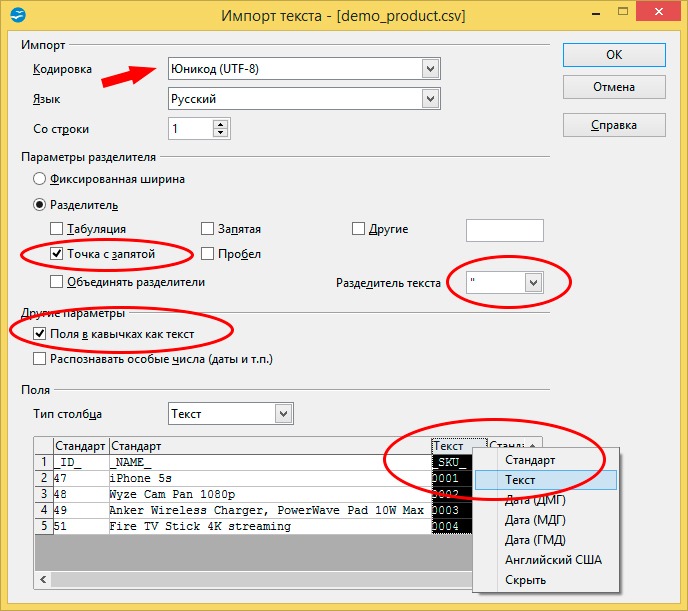
When opening a CSV file in Apache OpenOffice Calc, select the options according to the settings as shown in the screenshot below:- File encoding: Unicode (UTF-8)
- Column value separator ( CSV field separator ): semicolon (;) Text and reserved character
- separator
- : “
- double right-click to specify the column type (always text eng. Text )
How to save a CSV file correctly
Microsoft Excel does not know how to save CSV files properly; when saving in Microsoft Excel, you will get a CSV file depending on the regional settings of the system, usually the separator is a tab or comma and the encoding is Windows-1251 (for Russia).
To save the file in CSV format, select File > Save As .
In the Select file type window Text CSV (.csv) , check the box next to Change filter settings that appears at the bottom.
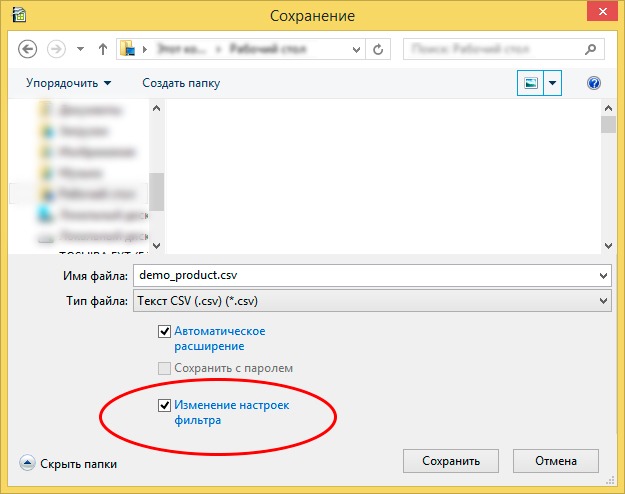
Click the Save button.
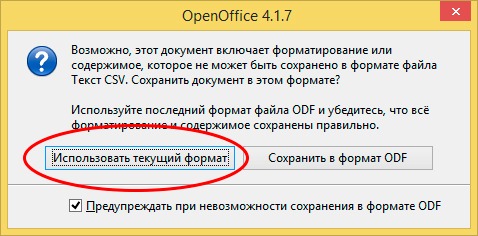
In the window that opens, select the Use current format option.
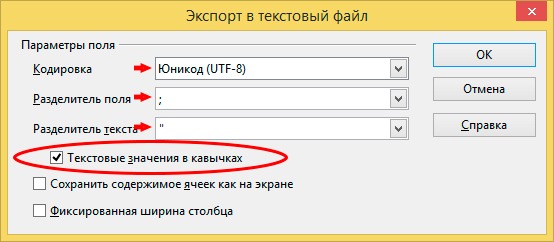
In the Export to Text File window, select:
- Encoding: Unicode (UTF-8)
- Field separator: semicolon (;)
- Text separator: double quote (“)
- Text values in quotes – select
How to check the format of a CSV file
CSV is a simple and common format for tabular data. It is a plain text file that contains unformatted text and has the CSV (.csv) extension instead of the traditional TXT (.txt) extension. Such a file can be opened by any text editor.Here is a non-exhaustive list of programs for opening plain text .txt or .csv files:
- Microsoft Notepad (Windows)
- Microsoft WordPad (Windows)
- Helios TextPad (Windows)
- Notepad++ (Windows)
- Notepad2 (Windows)
- Geany (Windows, Mac, Linux)
- Apple TextEdit (Mac)
- Apple Pages (iOS)
- Leafpad (Linux)
- gedit (Linux)
- KWrite (Linux)