Все про товар
Опис
Характеристики
Відгуки
0
Питання0
Встановлення модуля
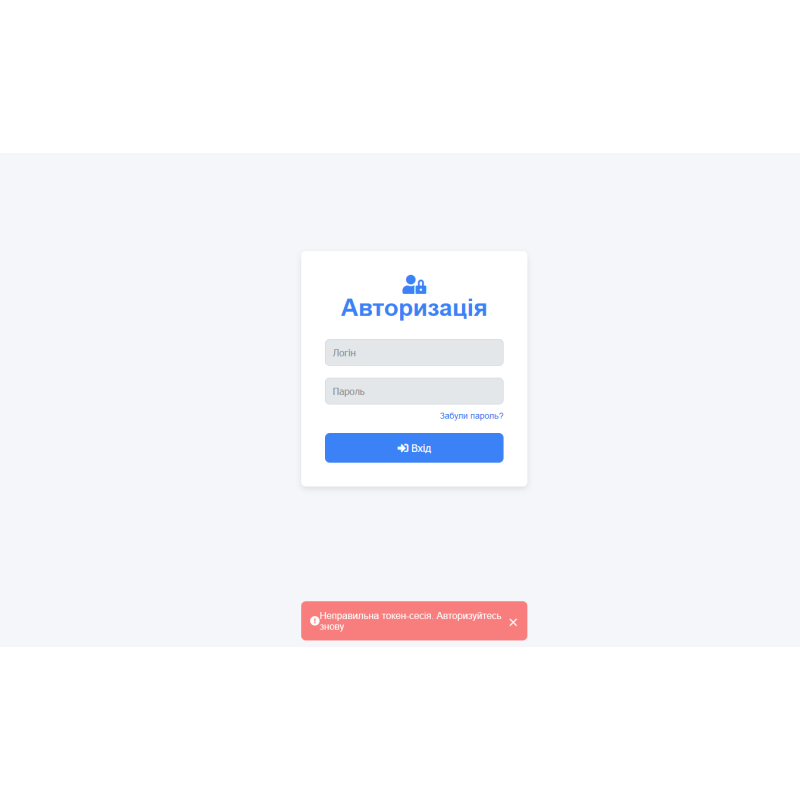



Шаблон Сторінка входу адміністратора та сторінка відновлення пароля для OpenCart
Модель: 484
В наявності
99 грн
Основні характеристики:
PHP:
7.2-7.4
Сумісність:
OpenCart 3, ocStore 3
Локалізація:
українська, російська, англійська
Ocmod:
Ні
Адаптація під ваш магазин:
Платна
Всі характеристики
Опис
Шаблон сторінки входу до адміністративної панелі та відновлення пароля адміністратора. Сторінку входу адміністратора за замовчуванням буде змінено.
Замінює оригінальні файли.
Цей шаблон сторінки входу для інтернет магазинів на Opencart 3 розроблений із врахуванням сучасних вимог до дизайну та зручності користування. Універсальний, чистий та стильний дизайн гарантує, що ваша сторінка виглядатиме професійно на будь-якому пристрої, будь то комп'ютер або мобільний телефон.
Основні особливості:
- Адаптивний дизайн: Шаблон автоматично підлаштовується під різні розміри екранів (мобільні телефони, планшети, комп'ютери), що забезпечує зручний доступ з будь-якого пристрою.
- Чистий і професійний інтерфейс: Мінімалістичний, але привабливий дизайн дозволяє створити враження високоякісного веб-сайту, який сприяє довірі користувачів.
- Гнучкість використання: Шаблон легко налаштовується під будь-які потреби. Ви можете змінити логотип, текст та інші елементи відповідно до вашого бренду.
- Покращена взаємодія з користувачем: Завдяки інтуїтивно зрозумілому інтерфейсу та елементам для підказок (наприклад, забутий пароль), користувачам буде простіше увійти в свій акаунт.
- Чистий код: Всі стилі і скрипти інтегровані безпосередньо в HTML-файл, тому шаблон не залежить від зовнішніх бібліотек. Це робить його простим для використання в будь-яких проектах, не вимагаючи додаткових налаштувань.
- Анімації та ефекти: Легкі анімації для спливаючих повідомлень і переходів між елементами надають шаблону сучасного вигляду та підвищують зручність користування.
- Безпека: Шаблон включає функціонал для захисту паролів і дозволяє користувачам ховати введені паролі.
Характеристики
Характеристики доповнення
PHP
7.2-7.4
Сумісність
OpenCart 3, ocStore 3
Локалізація
українська, російська, англійська
Ocmod
Ні
Адаптація під ваш магазин
Платна
Немає відгуків про цей товар, станьте першим, залиште свій відгук.
Немає питань про даний товар, станьте першим і задайте своє питання.
Встановлення модуля
Інструкція з встановлення модуля:
- Перед тим як виконати будь-які дій щодо встановлення доповнення в Opencart, ми рекомендуємо створити резервну копію всіх файлів сайту та бази даних магазину;
- Встановити фікс localcopy (якщо він у вас ще не встановлений)
- Завантажте файл модуля для потрібної версії Opencart з нашого сайту (Дотримуйтеся інструкції зі встановлення якщо така є в архіві з модулем);
- Потім перейдіть до розділу "Встановлення додатків/розширень" та натисніть на кнопку "Завантажити";
- Виберіть завантажений файл і дочекайтеся повного встановлення модуля та появи тексту "Додаток успішно встановлено";
- Після того перейдіть в "Менеджер додатків" та оновіть модифікатори натисувши кнопку "Оновити";
- Піля цих дій потрібно додати права на перегляд та керування модулем у розділі "Групи користувачів" для адміністратора, чи інших вибраних вами користувачів, натиснувши "Виділити все"