All about product
Description
Specification
Reviews
1
Questions0
Installing the module

Module True File Manager: Image Manager and Editor for OpenCart
Product Code: 230
Version: 1.3.1
In Stock
450 грн
Main specifications
PHP:
7.2-7.4
Compatibility:
OpenCart 2.0, OpenCart 2.1, OpenCart 2.2, OpenCart 2.3, OpenCart 3.0, OCStore 2.1, OCStore 2.3, OCStore 3.0
Localization:
Ukrainian, Russian, English
Ocmod:
Yes
Adaptation to your store:
Paid
All specifications
Description
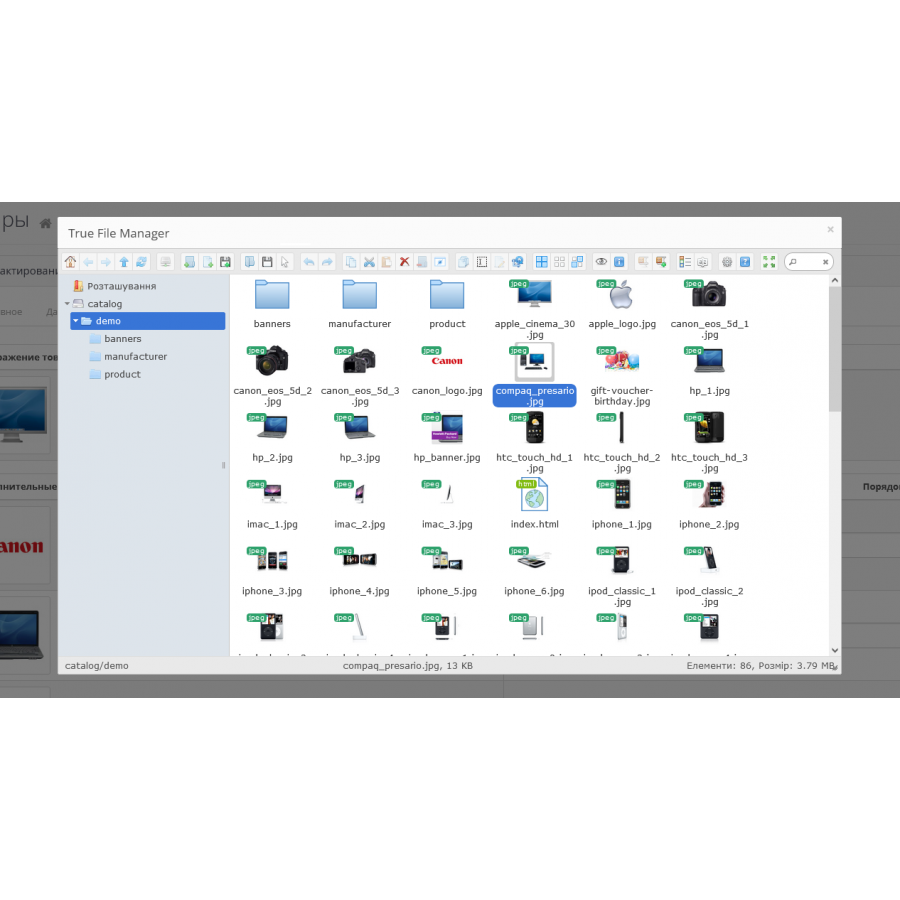
Convenient image manager and editor
Replaces the standard file manager.
Allows you to batch upload multiple files at once.
Simplifies downloading by simply dragging and dropping files and entire folders of files, and even archives of files (drag & drop).
Built on the basis of elFinder.
Does not cut images into thumbnails, so you will always recognize them easily.
You can (only some of the possibilities are listed)
And much, much more, which greatly simplifies working with images.
The big advantage of this module is that it runs in a JavaScript sandbox with its own versions of jQuery + jQuery UI, and is therefore compatible with any version of jQuery and/or jQuery UI used on your site. This ensures that you strive for the highest possible compatibility and non-conflict with any existing JS scripts on your site.
Replaces the standard file manager.
Allows you to batch upload multiple files at once.
Simplifies downloading by simply dragging and dropping files and entire folders of files, and even archives of files (drag & drop).
Built on the basis of elFinder.
Does not cut images into thumbnails, so you will always recognize them easily.
You can (only some of the possibilities are listed)
- rotate your sources and
- change their sizes,
- do pruning
- rename,
- make a quick view of sources in a convenient size, and not just as a thumbnail
- quick search by file name (just enter part of the file name, see video below)
- you can drag from your computer not only several files at once, but also an entire folder with files
- after dragging a file into the manager, focus is transferred to this file, i.e. it is not visually lost among other files, and therefore it is easy to immediately add to the product.
- the current folder is remembered, next time the manager will open on the folder you left
- You can download an archive with images by simply dragging and dropping and unzip it in one click from the manager.
And much, much more, which greatly simplifies working with images.
The big advantage of this module is that it runs in a JavaScript sandbox with its own versions of jQuery + jQuery UI, and is therefore compatible with any version of jQuery and/or jQuery UI used on your site. This ensures that you strive for the highest possible compatibility and non-conflict with any existing JS scripts on your site.
Specifications
Characteristics
PHP
7.2-7.4
Compatibility
OpenCart 2.0, OpenCart 2.1, OpenCart 2.2, OpenCart 2.3, OpenCart 3.0, OCStore 2.1, OCStore 2.3, OCStore 3.0
Localization
Ukrainian, Russian, English
Ocmod
Yes
Adaptation to your store
Paid
Ніколи не думав що це така зручна штука!! Рекомендую всім!
Is this review helpful?
1
No questions about this product, be the first and ask your question.
Installing the module
Module installation instructions:
- Before performing any actions related to installing an add-on in Opencart, we recommend creating a backup copy of all site files and the store database ;
- Install the localcopy fix (if you don't have it installed yet)
- Download the module file for the desired Opencart version from our website ( Follow the installation instructions if there are any in the module archive );
- Then go to the "Installing add-ons/extensions" section and click on the " Download " button;
- Select the downloaded file and wait for the module to be fully installed and for the text "Application installed successfully" to appear;
- After that, go to " Application Manager " and update the modifiers by clicking the " Update " button;
- After these actions, you need to add the rights to view and manage the module in the " User Groups " section for the administrator or other users you select by clicking " Select All ".